Zoom Fatigue: 4 Ways L&D Is Adapting Learning Delivery During Lockdown

This blog article was written prior to LEO Learning becoming part of GP Strategies.

We’ve reached out to our clients, colleagues and contacts across the industry to gain some meaningful data to correspond with our anecdotal insights. We’ve had feedback from over 70 industry leaders from a dozen countries across the globe, with significant input from the US and UK markets.

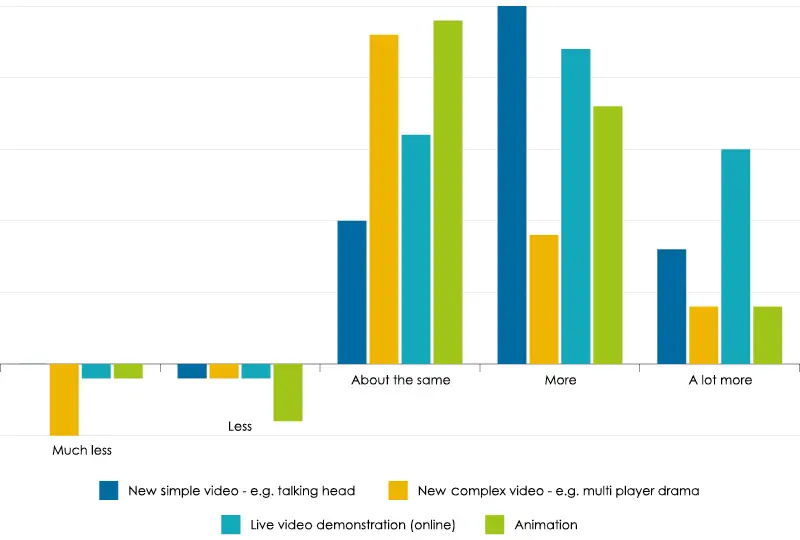
We asked the question: ‘Please identify the extent to which you are likely to reduce or increase your use of learning formats over the next 4-6 months as a result of changing ways of working?

Here is our take on the results:

Classroom Learning vs Digital Learning

We started with the obvious question, and were not surprised to see a shift towards digital delivery, prominently via webinars and eLearning. There is also an expected increase in podcast uptake, but not a lot more (‘a lot more’ is defined as above a 30% increase). This reflects that podcasts, due to their audio-only nature, are limited in their effectiveness as a distance-delivery method compared to those that combine audio with visual.

An interesting note here is that we received these responses in two stages, the first set one month into UK lockdown (early April 2020), the other about six weeks later. The scores for webinars dropped marginally in the second wave of responses, with eLearning showing a slight increase. Does this suggest a bit of webinar fatigue? This would marry with anecdotal evidence of PowerPoint-led webinar overload in the first few weeks of lockdown. This is perhaps a result of businesses rapidly adapting to the most immediately available tools.

Using Video in Learning

Video in learning can be incredibly engaging and serve a variety of purposes—from a CEO talking head video during onboarding through to complex drama and branching scenarios to gain emotional buy-in to your core message. At LEO, we’ve already acknowledged high-end video production has been severely limited during lockdown, and the results indicate this is reflected across the wider industry.

The anticipated uptake in live video demonstrations is interesting. We expected an increase, but not such a big one. These instructional-style videos can be relatively easy to produce and transcend distance effectively. There is arguably a wider acceptance of lower quality production values if the content still hits home. In the UK, this might be famed TV chef Jamie Oliver cooking at home, while in the US there’s popular YouTube channel, Binging with Babish. Lockdown has forced us to adapt and try things we were previously afraid to try. Now that we have, perhaps people are more willing to embrace these formats going forward?

We’ve seen examples of complex matters, such as equipment installations, being led through these videos. This would once have been the sole domain of a face-to-face session, with the associated time and travel costs.

Animation will see a predicted slight increase in use, as it’s an engaging delivery method that tells powerful stories and can replace high-end productions. Time-wise, it can also be highly efficient for learners. But animation can be expensive, and we know that budgets are being carefully managed due to the economic impact of COVID-19, so targeting this with precision will generate the biggest payoff.

The Adoption of Newer, Technology-Driven Formats

The lowest growth area in these formats looks to be Augmented Reality and Virtual Reality (AR and VR), and similar to animation, this is likely due to cost and complexity.

The most significant uplift is in delivery modes that enable social learning, such as discussion forums and social media. Again, low barriers of entry (costs, easy interoperability, time, etc.) and audience familiarity are likely key drivers here.

What About More Traditional Learning Methods?

We were also curious to see the views on more traditional methods of learning, acknowledging that many of them do have digital equivalents that can be used for distance learning (i.e. using Survey Monkey in place of opinion surveys). Out of all the questions we asked, using traditional learning methods had the biggest response for ‘About the same’.

It was encouraging to see the biggest predicted growth is the use of shared documents. The demand for increased collaborative working and shared spaces also potentially reflect some of the limitations of using Zoom (and the equivalent broadcast message delivery methods). Having 200 attendees can make it hard to work collaboratively and doesn’t offer a safe space for your more introverted learners to contribute.

If you’re wondering about off-the-shelf eLearning, our results indicate that there may be a slight increase, but not substantially. This tallies with Fosway’s Digital Learning Realities research, and potentially indicates that these types of courses are already being used to capacity, as needed. Your standard compliance eLearning requirements are unlikely to have significantly shifted during COVID-19. The decision whether you buy these courses off the shelf or create context-specific content remains the same.

About the Authors

Geoff Bloom
Geoff is a Principal Consultant and has worked in learning technologies and learning design and delivery since 1980. He joined LEO (now GP Strategies) in 2008, and has worked with a comprehensive range of clients across industries to deliver learning content, and define and evaluate a variety of learning strategies. Geoff was heavily involved in designing the NHS Leadership Academy, working alongside KPMG and the Universities of Manchester and Birmingham to develop over 1,200 hours of blended online content for a Master’s in Healthcare Leadership program. In addition, he has worked on a range of blended leadership initiatives for clients including Volvo, British Airways, and BP. Geoff holds an MBA. He enjoys watching rugby, swimming, and going to see live music. Follow Geoff on LinkedIn.

Get in touch.

Learn more about our talent transformation solutions.

Transformation doesn’t happen overnight if you’re doing it right. We continuously deliver measurable outcomes and help you stay the course – choose the right partner for your journey.

Our suite of offerings include:

  • Managed Learning Services
  • Learning Content Design & Development
  • Consulting
  • AI Readiness, Integration, & Support
  • Leadership & Inclusion Training
  • Technical Training
  • Learning Technologies & Implementation
  • Off-the-Shelf Training Courses


Producers: A Role Critical to Virtual Learning Success

At some point in our careers we have all experienced a virtual session that has gone wrong.  You’re unable to log in, you send in chats that go unanswered and ignored, and the background noise of another participant is loud and distracting. If the message and content is worth the investment in developing, then it is worth doing it well.

In early March, when our world was experiencing the disruption of daily life and business, I heard many organizations share their stories. One common theme was the need to expedite their virtual and digital learning strategy. But as organizations make this shift, many of these virtual sessions have been met with technical complications, delivery errors, and other issues creating a bumpy virtual experience.

As organizations move into virtual and digital learning, they need to consider adding a critical role to be successful. We have seen survey results from participants of virtual sessions and, frequently, the overall participant post-event survey scores increase when a virtual learning producer is present and supporting the session. Having a producer support virtual and digital learning will help take learning to the next level.

The Underrated Role to Deliver an Organized Session

Imagine a busy office running without the support of an administrator and office manager. Scheduling, customer service, deliveries, paperwork, and much more would add to their already busy schedules. The result would be people without any time, disorganized procedures, and other negative consequences. This is the same for virtual sessions.

We have all attended virtual training that felt chaotic, disorganized, and even distracting. These pain points detract from learning. The digital learning producer role can help take things from a mess to a big success.

Prior to the start of the session, the producer takes steps to set up the training for success. They establish the session in the platform, develop and send custom communications and instructions, and enable all features or tools to be used. A producer helps to establish a strong start to the session by sharing guidelines, answering participant questions, and enabling features that will be used throughout. Producers can provide tutorials on how to use the various tools such as annotation, whiteboards, and polling. They can also troubleshoot any technical challenges that a participant may be experiencing. This support creates a strong foundation for learning.

Imagine how challenging it can be as a facilitator to juggle participant questions, launch interactive tools, and keep participants engaged without a learning producer. We don’t want to eliminate those features, but better manage them. The producer can help by deploying polls, monitoring chat for Q&A, and setting up the whiteboards. This support enables the facilitator to remain focused on the learning and content.

Implementing Your Virtual Strategy With Producers

For these reasons and more, it is important to assess your producer needs and capabilities. Many organizations have shared that they have aggressive timelines in place in order to get learning into the hands of their employees. Because of this, many have leaned on their learning partners for support and upskilling in this space.

Organizations can implement training and certification programs to upskill people for these roles, including:

  • Designing virtual instructor-led training (VILT)
  • Developing virtual facilitation skills
  • Offering producer skill training on a variety of platforms

As you continue to develop and implement your virtual and digital learning strategy, try not to forget the underrated role of the producer. Their support will not go unnoticed in your next virtual training or meeting.

Learn about our Virtual Training and Delivery offerings at GP Strategies.

About the Authors

Megan Bridgett
Megan Bridgett, a leader in training and talent development for over a decade, helps organizations implement, optimize, and increase capabilities in their learning management initiatives.

Get in touch.

Learn more about our talent transformation solutions.

Transformation doesn’t happen overnight if you’re doing it right. We continuously deliver measurable outcomes and help you stay the course – choose the right partner for your journey.

Our suite of offerings include:

  • Managed Learning Services
  • Learning Content Design & Development
  • Consulting
  • AI Readiness, Integration, & Support
  • Leadership & Inclusion Training
  • Technical Training
  • Learning Technologies & Implementation
  • Off-the-Shelf Training Courses


Pride and Inclusion

In June 1999, President Bill Clinton proclaimed June as Gay and Lesbian Pride Month; 10 years later, President Barack Obama expanded the commemoration by declaring June as Lesbian, Gay, Bisexual, and Transgender Pride Month. And this month, the Supreme Court ruled that LGBTQ workers are protected from job discrimination. As leaders, it’s important to stop and reflect on the idea of pride and what it means in the context of inclusion and the psychological safety of our employees.

Pride is about being able to express ourselves. It’s about being able to share all parts of who we are. It’s about being able to bring our whole selves to any situation—including work situations.

When we are given a safe space to express ourselves, we speak up—not just about who we are, but what we think. And those ideas fuel new approaches or innovation. Those ideas highlight concerns that prevent failures. Those ideas benefit the leader and the organization. But do we need to bring in the personal elements of who we are to freely express our thoughts on topics related to a project? Organizational goals? What a client needs? In other words, can’t we speak freely on those topics without necessarily expressing pride about who we are as people?

Human beings are complex. We often compartmentalize and are selective about how much of our true selves we let others see.  Keeping certain beliefs private and not showing our true selves to others may seem like a good idea, but it can do way more harm than good. When leaders fail to cultivate an environment where employees feel safe to bring their whole selves to work, they don’t enable their people to show up with pride in who they are.

When we don’t have pride enough to be ourselves at work, we spend precious time and energy hiding what we don’t want others to see. We might navigate discussions about how we spent our weekend to avoid talking about our partner. We might monitor our body language, potentially concerned how a mannerism might be interpreted by our coworkers. The term for concealing something about one’s self to avoid making other people feel uncomfortable or to lessen attention to a given characteristic is called “covering.” When we spend time covering or monitoring how we appear, we have less time and little focus for the task at hand.

The cognitive stress associated with covering occupies an individual’s mind and impacts how and what we contribute. Mindshare is limited, so using any of it to self-edit detracts from an individual’s presence and contributions. If all portions of our mindshare were allocated to the work that needs to be done or the problem that needs to be solved, we could be more productive, creative, and genuine. So you see, pride and inclusion in the workplace can have a huge effect on a business.

What Leaders Can Do

While how much of our personal selves we want to share with coworkers should always be a choice, our leaders must create the conditions that give us the confidence that we can be ourselves. How can leaders create an environment where individuals are proud to bring their whole selves to the team? How can leaders create a team of individuals who feel good about the contributions they are making and proud of who they are—proud of their race, sexual preference, gender, or age.

Our research on leadership mindsets tells us that the most significant thing a leader can do to demonstrate an inclusive mindset is to reach out to individuals who look, think, and behave differently from them (43%). Leaders who responded to our research survey also acknowledged the need to recognize their own unconscious bias and to account for it proactively (19%) and to take actions to stop microaggressions or other biased behavior (15%).

What leaders also acknowledge in their responses is that being able to surface those biases is one of their biggest challenges. The leaders we surveyed told us they felt it was “important for them to reflect and understand their own biases and to uncover how those biases impact their decisions,” and to “recognize systemic biases ingrained in their company’s culture which are difficult to change.” They told us, “Unconscious bias is there even if you think your behavior doesn’t show this. We all make instant judgments on people, based on our inane value system developed from birth by our surroundings, upbringing, peer groups, and parents or careers.”

The inclusive mindset is one of our four mindsets for a reason: Thinking inclusively isn’t something a leader should do when they get around to it or because June is Lesbian, Gay, Bisexual, and Transgender Pride Month. Having this mindset is about leading inclusively and demonstrating inclusivity in the context of all leadership actions. How can you delegate inclusively? Coach inclusively? Lead through change inclusively?

Thinking and behaving inclusively needs to become part of the fabric of leadership DNA. The more leaders create environments where individuals feel proud to bring their whole selves to their jobs, the more included and safe people will feel, creating situations where individuals and their organizations can thrive.

About the Authors

Leah Clark
Leah Clark is the Leadership Practice Lead at GP Strategies, as well as an author and the founder of LeaderConnect. With over 28 years of experience in her field, Leah brings a unique perspective on the mindsets and skillset that are critical to leadership success to her coaching and consulting. Her clients benefit from her collaborative approach to crafting a well-connected and thoughtful leadership development strategy. Leah holds a Master of Arts; Organizational Psychology, Columbia University and a Bachelor of Arts; English and Sociology, Boston College.

Get in touch.

Learn more about our talent transformation solutions.

Transformation doesn’t happen overnight if you’re doing it right. We continuously deliver measurable outcomes and help you stay the course – choose the right partner for your journey.

Our suite of offerings include:

  • Managed Learning Services
  • Learning Content Design & Development
  • Consulting
  • AI Readiness, Integration, & Support
  • Leadership & Inclusion Training
  • Technical Training
  • Learning Technologies & Implementation
  • Off-the-Shelf Training Courses


Moving from Traditional Performance Management to Continuous Performance Management

Traditional Performance Management Process

Since Continuous Performance Management (CPM) was introduced by SAP in SuccessFactors as part of the Performance and Goals Management (PMGM) license, it has slowly grown, both in functionality and usability. Initially, CPM was mostly seen as an add-on to Performance Management (PM), but during the last year, a clear trend has emerged.

More and more organization are replacing part of, or even all of, their PM process with a CPM setup. A traditional PM process looks something like this:

The PM process includes a number of steps employees often find overly complicated. They only access the PM tool a few times a year, and it can be difficult to remember what they need to do and where they need to do it. This means employees can have a bit of resistance toward the tool each time they need to access it. For managers, it’s a bit easier since they need to access the tool more frequently to work on employee PM processes.

PM objective-setting and approval of same need to happen at the beginning of the year. This means the PM process needs to be in place and launched at the beginning of the year as well. For some HR departments, this might be a bit of a struggle as they’re typically busy with year-end processes like calibration, and because the final process has not been defined by management yet. Since it’s difficult and not recommended to change the process after it’s been launched, there’s added pressure to get the right PM process launched early.

Simplifying the PM Process and adopting CPM

To solve these issues, we recommend and have seen some of our clients implement a simplified version of the PM process by using a CPM solution. Although the solution can vary from organization to organization, incorporating a CPM solution offers a number of benefits, including:

Removal of the Interim/Mid-Year Review

It can take up to nine months to complete everything, from objective-setting through the annual review. To ensure employees are on track, the process typically has an interim review halfway through the year. Some clients have more than one—some even four (one per quarter). But instead of having these fixed steps, CPM can be used in parallel with the PM process to replace the interim review.

The CPM features give employees and managers a place to document and track the process, and because it’s flexible, it can be used once or as many times as it’s needed during the year.

Removal of Objective-Setting

Some clients who have removed their interim review have also removed objective-setting. This means their PM process now starts at the annual review, meaning the process isn’t even used the first nine months of the year.

Interim reviews and objective-setting are replaced by a CPM function and the process looks like this:

But how do these companies set objectives for the year? They do it via an Objective Plan. An Objective Plan has a number of features, like cascading and team targets, that are not available from the PM form.

What about approving objectives? This is also done from the Objective Plan, using the Objective Plan States. This allows employees and/or managers to change the state of the Objective Plan from Open to Approved. This way, the objectives can be limited, ensuring they’re not changed during the year.

Removal of Employee from PM Process

Some clients even take the adoption of CPM a bit further and remove employees from the active part of the PM process. If employee input during the year-end review can be removed, they only need a read-only copy at the end of the process to keep track of their evaluation and any comments made by their manager.

If employees don’t need to give ratings on the objectives, comments, or other types of info, they can be removed from the process. This means they would instead use the Objective Plan and CPM throughout the year, which means better and more up-to-date data.

If employees don’t need to have a copy of the completed form, their access to the performance menu can be removed, simplifying the tool even more.

If you want to know more about CPM or would like to talk about how CPM can be incorporated in your PM process, contact us for a free one-on-one consultation.

About the Authors

Jesper Sloth Andersen
Jesper has 18 years of experience from IT consulting, 6 of which have been focused on SuccessFactors, specializing in Performance and Goals. Having been a part of 30+ implementations, Jesper has worked in countries across EMEA, APAC, and the Americas. Jesper currently holds a professional certification in SAP SuccessFactors Align & Perform and an Associate certification in SAP SuccessFactors Compensation Management.

Get in touch.

Learn more about our talent transformation solutions.

Transformation doesn’t happen overnight if you’re doing it right. We continuously deliver measurable outcomes and help you stay the course – choose the right partner for your journey.

Our suite of offerings include:

  • Managed Learning Services
  • Learning Content Design & Development
  • Consulting
  • AI Readiness, Integration, & Support
  • Leadership & Inclusion Training
  • Technical Training
  • Learning Technologies & Implementation
  • Off-the-Shelf Training Courses


13 Essential Tips for Home Videography

This blog article was written prior to LEO Learning becoming part of GP Strategies.  

Large-scale, broadcast-standard video productions may not be feasible for your organization, but that doesn’t mean you can’t still create video content that resonates with your learners. Adapting your video content requires flexibility, but the good news is you don’t need to be a pro to make it work. Individual contributors can record messages that form a powerful part of your learning blend

Interviews, hints and tips videos, and leadership messages can all be recorded and delivered at distance. If you’re interested in bringing a professional feel to your efforts, these tips on video recording will help you polish your content. 

Setting Up Your Home Studio

While you don’t need a fancy studio space, putting some thought into how and where you shoot will greatly improve the quality of your videos.  

Essential Equipment

Use Your Phone, Not a Webcam

Modern-day mobile phones tend to produce much better image quality than a webcam on a laptop, so use these where possible. Phones are, of course, small and portable, giving you greater flexibility in positioning them and creating the best possible framing for your video. And flexibility is the name of the game when it comes to finding the best spot possible for a home recording. 

Make Sure you Record in Landscape 

The dimensions of a landscape screen are similar to a standard filming frame (1920×1080). This immediately gives a more professional output compared to shooting in portrait orientation. 

Stabilize Your Device for a Steady Recording

A video with too much motion can be hard to watch, so make sure your phone is static when recording. A degree of lenience towards overall quality tends to be given for home recordings, but a shaky image is hard to ignore. There are a variety of commercial phone stands and mounts that are made specifically for shooting video, although you can achieve the same effect by propping your phone up with books or resting it against a mug. Regardless of the method you choose, make sure that the device is securely positioned and is not tipping backward or forwards. 

Choosing the Best Location 

When filming, be mindful of what’s in your background. Shooting with a white wall or plain backdrop can look dull, while unnecessary clutter can distract your viewer. Utilize colorful spaces and interesting interiors. 

It is likely you’ll be using the phone or tablet microphone when recording, which means you need a quiet space. It’s recommended that you film inside to avoid as much background noise as possible (we’ll cover more on audio quality below). 

Set Up to Allow for Depth of Field

To get the best image possible, you need to create depth of field. This will help separate your subject from the background. If possible, place the subject roughly six feet away from the background. Standing too close to a wall will put everything in focus, when all you want in focus is the person on camera, with the background blurred out. 

The camera should be roughly three feet away from the subject, with the interviewee stationed around six feet away from the background wall. 

Improving Video Quality 

Now that you have set up your home studio, it’s time to focus on the quality of your videos. These video recording tips will help you improve how your content looks and sounds.  

Lighting Tips 

Shooting in a room with a window is an effective way of obtaining enough light for your interview. The use of natural light will also help you avoid unwanted color hues that may appear with artificial lighting. Be sure that the window is out of shot, ideally to the left or right side of the subject’s face, and, whatever you do, do not place your subject directly in front of the window, as they will appear silhouetted. 

Camera Placement 

The camera on the back of a phone or tablet is almost always better than the one on the front, meaning if you are the subject of the video, you won’t be able to see yourself. 

To get around this, get your camera set up and take a few photos using the countdown timer to make sure you’re positioned correctly. You ideally want to be centered in the frame, with just your head and shoulders in shot, although you may want to play with the placement of your subject in the frame (more on that below).  

Enhancing Audio Quality

Choosing the Right Location for Audio 

Try to give yourself some space when recording video. A small room can create a “boxy” sound with reverberation or echo, so finding a decent-sized room is better. It’s also important to remember that bare walls and empty rooms without furniture will create a stark sound. Your best bet is to record in a room with plenty of soft furnishings to help “deaden” the audio. 

Best Microphones

Whether it’s an external microphone or one in a phone, tablet, or laptop, try to find the best distance from it. Ideally, the speaker’s mouth should be about a foot away from the microphone. With an external microphone, this may mean mounting it on a stand. When shooting, be sure to pay close attention so that the microphone does not appear in the frame. 

Reducing Background Noise

We get used to the hustle and bustle in our lives, to the point where we’ve learned to ignore certain background noises. Make sure you are in the quietest spot you can find, avoiding places with recurring or “sudden” noise pollution. 

Filming Techniques 

Performing for a camera may not come naturally to everyone, but these next tips are always worth remembering, whether your subject is a seasoned pro or just starting out. 

Framing and Composition 

Off-center compositions can be more interesting than placing your subject in the center of the frame. You can make your videos more visually appealing by using the rule of thirds. The rule of thirds divides the frame into a nine-panel grid. Placing your subject along the intersection points of this grid will help you balance your subject with negative space  to create visual interest.  

Appearing in Front of the Camera

Bringing the right energy to your clips will have a significant impact on the success of your approach. Your subject normally won’t be on screen for very long, so make it count by making sure that they are: 

  • Clear 
  • Energized 
  • Emphatic 

Consider the differences in tone between an academic lecture, a radio ad, and reading a child’s story. They all have very different pacing and energy. Consider what’s right for you, your message, and for your audience. 

Make Sure the Subject is Comfortable 

When someone is filming you, it can be intimidating. Have your subject take their time when speaking to the camera and don’t worry about executing everything perfectly in one take. The beginning and the end of your clips can be cropped, leaving the “meat” in the middle. So, give your subject a moment before they start speaking to collect their thoughts and focus. Any extra footage at the beginning and end of your recording can easily be cut. 

Optimizing Your Home Filming Setup

Creating quality videos does not require a professional studio or advanced equipment. By focusing on key aspects like lighting, audio, and framing, you can produce engaging content that resonates with your audience. These tips will help you elevate the quality of your videos, making them more polished and impactful. With a little preparation and attention to detail, your home videos can achieve professional-grade results. 

Are you interested in upgrading your video efforts? Our team of video specialists can help bring your learning content to life.  

About the Authors

Frank McCabe

Get in touch.

Learn more about our talent transformation solutions.

Transformation doesn’t happen overnight if you’re doing it right. We continuously deliver measurable outcomes and help you stay the course – choose the right partner for your journey.

Our suite of offerings include:

  • Managed Learning Services
  • Learning Content Design & Development
  • Consulting
  • AI Readiness, Integration, & Support
  • Leadership & Inclusion Training
  • Technical Training
  • Learning Technologies & Implementation
  • Off-the-Shelf Training Courses


Influencing Across the Organization

Chances are you rely on others for some aspect of your work. Whether it’s relying on your coworkers for information to complete a proposal, or relying on the finance department to provide you with the data to manage your sales region, or even if it’s relying on your customers to buy your product or service, it’s unlikely that you can achieve personal or organizational success on your own.

In traditional hierarchical, command-and-control organizations, individuals were often able to rely on their positional power and formal authority to pressure others into doing what they needed, regardless of the others’ point of view or will. While this may have had short-term benefits for those in power, it created a dynamic that led to disenfranchised employees with low morale, poor strategic thinking skills and a lack of trust in leadership. As organizations have become flatter and more matrixed, leaders across all levels of the organization must find other ways to motivate, influence, and make changes in the organization using their network.

The phrase influencing without authority is somewhat of a hot button in today’s business world. Being able to influence others without formal authority is a challenge that people see as the crux of many of their day-to-day frustrations. In matrix organizations, employees are often inundated with competing goals, deadlines, and battles for resources. It’s easy to get lost in this chaos and forget that everyone is ultimately working toward a common definition of organizational success. This applies to those with positional authority as well! Senior leaders and executives face many of the same struggles and must influence their colleagues and people across their network to drive business outcomes. Follow the five tactics below to jumpstart the process of becoming an effective influencer.

Tip 1: Bank Social Currency

To effectively influence without authority, you need to start before you get into a situation where you need to influence someone else. We refer to this as “Laying the Groundwork.” You should be setting yourself up for success every day by forming trusting relationships with colleagues, building your credibility within the organization, and by developing and nurturing your network.

Don’t wait until you need something to begin connecting with others. You should be reaching out to help people and accepting their requests to provide support on an ongoing basis. You can think of this as banking social currency.

In an informal survey taken by GP Strategies, three quarters of respondents said that they’d be more likely to do something for someone else if he/she had done something for them in the past. If you regularly help out others, you can cash in some of the currency that you’ve banked and use it to solicit support from them when the time comes. It’s important not to do this in a way that comes across as “I’ll only do this for you if you do something for me down the road.” That would compromise your goals; instead, do things thoughtfully and selflessly on a daily basis, and you’ll find that when you need assistance from those who don’t report to you they’ll be more likely to jump on board.

While you may be caught off guard at times, in general influencing without authority is not something that should happen spontaneously or “on the fly.” Every situation is different — there are unique contextual factors to consider such as budget, timelines, organizational politics, constraints, historical implications, external market pressures, technology, competitors, etc. Each of these factors, in isolation and combined to create a big picture, can impact the approach that you take when planning for an influencing conversation. For example, if you know your department’s budget is stretched thin but you still try to convince your manager to invest in a new idea without acknowledging or considering the budget, chances are that you will be turned down before you finish your argument. Thinking through each part of the context can help you formulate your point of view and the key points that you want to touch on when influencing without authority. In fact, at times it may even make you realize that your idea is not feasible within the grand scheme of things.

Tip 2: Do Your Homework

As you consider these situational factors you must also remember that you’re trying to influence other humans, each with their own perspective and approach. Every individual with whom you interact has individual goals related to his/her department or project assignments, individual preferences, needs, pet peeves, and motivators. This leads us to our third tip…

Tip 3: Follow the Platinum Rule

Since the beginning of time the “golden rule” seemed to be the mantra for living a noble life — treat others as you’d want to be treated. If you prefer kindness, integrity and respect, give the same to others. While this may ring true for more ethical, moral types of situations, when it comes to influencing without authority it can actually be detrimental. George Bernard Shaw has been quoted as saying: “Do not do unto others as you expect they should do unto you. Their tastes may not be the same.” George was onto something. The golden rule neglects to take into account people’s uniqueness in terms of innate needs and preferences, as well as the specifics of the situation and context. Over time, the golden rule has morphed into the platinum rule, which does account for these differences. The platinum rule asserts that we should treat others as they’d want to be treated — we’ll have greater success when we meet people where they are versus where we want them to be. This new rule has a couple of implications for influencing. First, you need to make sure that you’re communicating your thoughts, ideas, and perspectives in a way that meets the communication preferences of your audience. Ask yourself the following questions before planning your influencing approach:

  • Does my audience prefer a high-level overview or the details?
  • Do they prefer formal or informal interactions?
  • Do they prefer face-to-face communication or electronic?
  • Do they need lots of context or do they prefer I get to the point?
  • Do they require a lot of supporting data or do they want to hear the highlights?

By presenting information in a way that resonates with those you’re trying to influence without authority, you will set yourself up for success, as well as save yourself time and re-work in the long-term from having to reorganize or reframe your ideas. If you were to present information in a way that only works for you, you risk losing your audience before they even hear what you have to say, simply from the format of your presentation.

Second, the platinum rule encourages us to think of how to position our ideas in a way that shows how they meet others’ needs. That takes us to Tip #4.

Tip 4: Target the Benefits Bullseye

Whenever you’re trying to obtain buy-in for something, it’s best to position it in a way that shows how it is of benefit. GP Strategies leverages a model called the Benefits Bullseye, which encourages individuals to think of a range of benefits for any idea, assignment, or initiative.

Articulate how your idea benefits the customer, the broader organization, a specific team or department, and the individual with whom you’re talking. Depending on your audience, they may be more persuaded by hearing the benefits at particular levels. For example, your CEO or President might be most interested in hearing the organizational and customer benefits. The head of your department might want to hear how your idea will improve the department or make it more successful in some way. The VP of Marketing will likely want to focus on how it impacts the customer. By knowing the full range of benefits in depth, you can easily articulate these during conversations when you’re trying to influence without authority.

There is no question that when you can communicate how your idea will benefit the specific individual with whom you’re talking, your level of influence will increase. These benefits to the individual fall at the center of the model — in the bullseye. Many refer to this bullseye as the WIIFM (What’s In It For Me). When people hear how something will lead to greater levels of satisfaction or make life easier for them in some way, they will be more inclined to support that thing — it’s human nature. The benefits do not always have to be life-changing. Some examples of individual benefits might be that a project will provide the person with exposure to a new technology, a new group within the organization, or to senior leadership. Perhaps an idea will allow for an individual to free up time to focus on things of greater interest. A new assignment might help an individual develop skills that will set him/her up for increased chances of promotion. When people hear that something will be of value to them they’re more likely to agree with it, whether you have the authority to force them to or not.

Tip 5: Tie it Back to the Business

Finally, whenever you can, link your influencing goals back to the business. Individuals have an innate need for significance and being involved in meaningful work. GP Strategies’ ongoing career research demonstrates that “meaningful work” — by which we mean the impact our work has on others or society at large — is one of the top three factors people look for in their careers.

Individuals will be more likely to buy-in when they see the impact that your idea or the assigned responsibility will have on the ongoing success of the organization. After all, if they are employees of the same organization they have a vested interest in ensuring its success.

By following the five tips above, you will set yourself up for success in situations where you have to influence without authority. Not only will you be able to drive ideas, initiatives, and points of view forward, but you’ll do so in a way that’s collaborative and inclusive, creating an empowered, engaged workforce. Collaboration and dialogue will get you win-wins and promote a culture where influencing becomes less of a requirement because helping and supporting others become the norm.

About the Authors

GP Strategies Corporation
GP Strategies is a global performance improvement solutions provider of sales and technical training, e-Learning solutions, management consulting and engineering services. GP Strategies' solutions improve the effectiveness of organizations by delivering innovative and superior training, consulting and business improvement services, customized to meet the specific needs of its clients. Clients include Fortune 500 companies, manufacturing, process and energy industries, and other commercial and government customers.

Get in touch.

Learn more about our talent transformation solutions.

Transformation doesn’t happen overnight if you’re doing it right. We continuously deliver measurable outcomes and help you stay the course – choose the right partner for your journey.

Our suite of offerings include:

  • Managed Learning Services
  • Learning Content Design & Development
  • Consulting
  • AI Readiness, Integration, & Support
  • Leadership & Inclusion Training
  • Technical Training
  • Learning Technologies & Implementation
  • Off-the-Shelf Training Courses


Improve Hiring in SuccessFactors Employee Central

One of the main arguments for using or switching to SAP SuccessFactors is Employee Self-Service. It’s a great idea to let employees manage their own data so that it is up to date, which can be a strong selling point for a majority of companies and their employees.

Self-service works and has improved data quality in many companies. By allowing employees to manage their own data, such as an address update or a name change, the risk for inaccurate or corrupted information is minimized. Most of the hire-to-retire journey is covered in Employee Self-Service, but the first step in the process—hiring an employee—requires a lot of information in one form, information anyone outside HR would struggle to fill in. So, should you open self-service for such an important process? Having worked on hundreds of SuccessFactors implementations, GP Strategies recommends:

  • If the data model and surrounding processes regarding compensation, for example, are simple and clearly defined, then the answer is yes. You should be open to allowing people outside of your HR department to access that information.
  • If your company is larger, spans more entities, shares data with multiple payroll systems, or just has more data to track, the answer is no. We suggest not taking this route with the standard system.

If you intend to have managers hire their own team, they will need training in how to use the Employee Central built-in Add New Employee tool. The requirement to complete this comprehensive form with hundreds of fields can be overwhelming for managers, and they might be uncomfortable asking certain questions about topics such as the new hire’s pay scale.

New hire administration is a pain point for many clients, but does it really have to be this difficult? GP Strategies has, together with our client, a large Scandinavian retail chain, cracked the nut and built an extension, Ragnar, to support the process. Ragnar, the new hire tool, enables the managers to hire into their team with next to no training. Assisted by Ragnar, they avoid the pitfalls of using and keying in incorrect data. Hiring new employees can be done in a manner of minutes. Employee Self-Service is back in business!

Learn more about the GP Strategies SAP Cloud Extensions.

About the Authors

Tom Cieslak-Kristensen
Tom has more than 12 years of experience with web and e-learning development and consulting including more than 5 years of experience with SAP SuccessFactors implementations. Tom currently leads the GP Strategies Extension team, designing and building custom applications in and around SAP SuccessFactors. Prior to his current position, Tom was specialized in SuccessFactors Employee Central and Learning Management (is Professionally certified in both) and has completed end-to-end global project implementations as both consultant, lead consultant, technical lead and project manager. Tom speaks fluent Danish and English.

Get in touch.

Learn more about our talent transformation solutions.

Transformation doesn’t happen overnight if you’re doing it right. We continuously deliver measurable outcomes and help you stay the course – choose the right partner for your journey.

Our suite of offerings include:

  • Managed Learning Services
  • Learning Content Design & Development
  • Consulting
  • AI Readiness, Integration, & Support
  • Leadership & Inclusion Training
  • Technical Training
  • Learning Technologies & Implementation
  • Off-the-Shelf Training Courses


Moving to the Cloud with SAP SuccessFactors: “Big Bang” vs. Phased Migration Approach

Wondering how to most effectively move to the cloud? We put together a short guide to get you started. Continue reading or download the infographic.

As companies have begun transitioning to the cloud, we at GP Strategies have received a number of questions about the best way to transition from an on-premise SAP® system to cloud-based Employee Central (EC). Should you roll out EC all at once, “Big Bang,” or in a phased approach, by geography, business unit, etc.?

First you need to determine whether you plan on keeping your SAP system up to date after going live on EC or whether you will retire it. This will determine your approach.

In our experience, most companies choose to keep their SAP environment running on premise even after they begin moving to the cloud. That’s because most companies are running an existing payroll in SAP and aren’t yet ready to move to Employee Central Payroll.

Payroll is a complex process with a high number of existing integrations that need to be reproduced in Employee Central in order to make it work. This can be too daunting a task as part of the initial rollout because it requires coordination across many different vendors, all of which have their individual testing requirements.

In our opinion, the lower risk approach is typically to replicate from your Employee Central environment back to the legacy SAP platform and let the existing integrations and payroll processing run as they currently do.
However, each organization has its own goals and bandwidth considerations, so let’s review your two main options for migrating to the cloud.

The “Big Bang” Approach

If your plan consists of having all employees go live at the same time, you are looking at what’s called a “Core Hybrid” approach for your data replication back to SAP. This means that you will use Employee Central as your  system of record for all employees and the employee data will flow only one way (EC–> SAP).

THINGS TO REMEMBER:

1. Data migrations, conversion, data validation approaches, and all required regulatory approvals must be confirmed globally for go-live.

2. Switching to a phased approach after the project kick-off is NOT recommended because it requires a total redesign of your approach and replication process.

TIP
Begin your mapping process as early as possible!

The Phased Approach

If you plan on staggering your employee go-lives, then you are looking at a “Side-by-Side” or phased approach. This means that the live population will use Employee Central as the system of record and will replicate employees down to legacy SAP. For the non-live population, however, you will maintain SAP as the system of record and transfer the relevant information for these employees to Employee Central using either web service integration or file
extracts.

THINGS TO REMEMBER:
1. Split your population by company or country for the phases.
2. Configure the allowed countries as part of the SAP inbound logic to filter out countries that are not in scope.

TIP
Filter the employees sent over by the inverse set of companies/countries as the live populations to avoid any circular employee updates.

We hope these pointers helped you understand whether an all-at-once or phased approach is right for you. If you have any questions, feel free to contact us.

Want more content like this? Subscribe to our blog to get it directly to your inbox!

About the Authors

Michael White
As Director of SAP Technologies for GP Strategies’ Human Capital Technology Group, Michael is responsible for managing the technical resources that perform development and integration work in and out of both the SuccessFactors cloud solutions and the SAP ECC software platform. He has been working with SAP software since 2006 in a wide variety of roles ranging from Solution Architect all the way to Software Developer. This gives him a unique understanding of the SAP architecture from both a functional and detailed technical level and enables him to both understand the needs of the customer and immediately assess how the system can or cannot meet those needs. Michael holds a Master of Science in Computer Science and a Bachelor of Science in Computer Science from the Georgia Institute of Technology. He has also presented at multiple SAP Insider conferences in both the USA and Europe as well as the Houston ASUG conference.

Get in touch.

Learn more about our talent transformation solutions.

Transformation doesn’t happen overnight if you’re doing it right. We continuously deliver measurable outcomes and help you stay the course – choose the right partner for your journey.

Our suite of offerings include:

  • Managed Learning Services
  • Learning Content Design & Development
  • Consulting
  • AI Readiness, Integration, & Support
  • Leadership & Inclusion Training
  • Technical Training
  • Learning Technologies & Implementation
  • Off-the-Shelf Training Courses


What’s Your Strategy for When the Sun Sets on SAP Payroll On-Prem?

SAP will retire their On-Premise support in a few years from now, a situation many SAP on-premise customers are dreading. Does the task of starting from scratch, implementing a new cloud payroll solution seem unachievable? Has your organization spent years of effort and resources customizing and building the perfect solution that you now fear you will lose?

You are far from alone. This is why the team at GP Strategies has built a program to help you. Project Sunrise will allow you to seamlessly migrate all your custom objects, reports, enhancements, and other content to the cloud. As a side bonus, you also gain an accelerated implementation, reducing both time and cost by more than 50%.

What is Project Sunrise? 

  • Project Sunrise is a combination of tools and programs that allows customers to accelerate the transition from SAP HCM on-premise Payroll to Employee Central Payroll.
  • Project Sunrise allows you to seamlessly migrate the following:
    • Business-related custom reports
    • Customer-specific enhancements
    • Payroll configuration contents inclusive of schemes, calculation rules, features, functions, and more

Who benefits?

This program would benefit you if you are currently on an SAP on-premise Payroll solution and want to:

  • Make the move to the cloud without losing existing customizations.
  • Cut implementation time in half.
  • Save cost on delivery.
  • Get a seamless rollout of SuccessFactors EC Payroll.

How do you get started?

Would you like to learn more about how your migration path might look like? GP Strategies offers a free assessment at a time that suits you. The assessment consists of a 1-hour online consultation with one of our certified payroll experts. If you would like an assessment for your organization, get in touch to set up a call today.


About the Authors

Vikkesh Bhatt
Vikkesh has more than 10 years of experience with HCM and IT consulting. He is a highly skilled, accomplished and trained SuccessFactors enthusiast with extensive knowledge of human resources business processes and core competencies. Vikkesh specialties include superior communication and organizational skills obtained by years of experience in various roles, as well as great technical proficiency and a firm understanding of SuccessFactors HCM and Human Resources. Vikkesh currently holds a Professional Employee Central Certification.

Get in touch.

Learn more about our talent transformation solutions.

Transformation doesn’t happen overnight if you’re doing it right. We continuously deliver measurable outcomes and help you stay the course – choose the right partner for your journey.

Our suite of offerings include:

  • Managed Learning Services
  • Learning Content Design & Development
  • Consulting
  • AI Readiness, Integration, & Support
  • Leadership & Inclusion Training
  • Technical Training
  • Learning Technologies & Implementation
  • Off-the-Shelf Training Courses


Understanding the Relationship: Asset Management to Asset Performance Management

There are various schools of thoughts on what asset performance management (APM) is and how it relates to asset management (AM).

ISO55000 defines asset management as systematic and coordinated activities and practices through which an organization optimally and sustainably manages its assets and asset systems and their associated performance, risks, and expenditures over their life cycles for the purpose of achieving its organizational strategic plan.

The goal is to achieve a defined fit for purpose asset management framework (AMF) as a baseline for monitoring a return on investment (ROI) based on a strategic asset management plan (SAMP) that includes the organizational and asset management objectives, such as the organization’s operations and maintenance objectives.

To ensure the AMF is properly designed, an asset performance management (APM) implementation process and road map need to be in place to establish the asset management objectives and plan necessary to deliver results in accordance with the organization’s asset management policy and strategic plan.

A common misconception of asset performance management is that it only entails physical asset condition monitoring and assessment, like monitoring vibration, pressure, and temperature by using sophisticated technologies like advance pattern recognition (APR) tools to proactively predict the equipment failure.

Although the above process establishes the fact of a predictive process and can be viewed as proactive maintenance, APM also entails the capabilities of data capture, integration, visualization, and analytics tied together for the explicit purpose of improving the reliability, availability, and operability of physical assets. APM helps maximize equipment return on asset (ROA) and return on investment (ROI) and reduces risk factors, which includes asset strategies such as condition monitoring, predictive forecasting, and reliability-centered maintenance (RCM).

APM practically ensures operational and maintenance goals and objectives are clearly implemented, communicated, embedded, and sustained across the organization in accordance with the AMF.


Below is the Asset Management/Asset Performance Management Alignment Matrix

Answering these big questions is no small feat. Any objectives that involve AM and APM require comprehensive, unique, and easily integrated solutions. Many organizations are just beginning to take a fresh look at asset management from WHAT-to-do, to HOW- to-do perspective. GP Strategies can help you get started on your journey of HOW- to-do with our APM OptimizeTM, which was designed to address these needs and more across industries like oil and gas; energy; automotive; pharmaceutical; metals; food, beverage, and consumer goods; manufacturing; and more.

About the Authors

Chuma Chukwurah
Chuma John Chukwurah is the Asset Performance Management (APM) Services Director at GP Strategies. He is an APM specialist with over 20 plus years of working experience in various fields of APM, Asset Integrity & Process Safety, Maintenance, and Reliability design and delivery. Chuma oversees the APM solutions/delivery, services, and sales in multiple market sectors, including energy, pharmaceutical, food and beverage, electronics/semiconductor, metals, oil & gas, process, and others.

Get in touch.

Learn more about our talent transformation solutions.

Transformation doesn’t happen overnight if you’re doing it right. We continuously deliver measurable outcomes and help you stay the course – choose the right partner for your journey.

Our suite of offerings include:

  • Managed Learning Services
  • Learning Content Design & Development
  • Consulting
  • AI Readiness, Integration, & Support
  • Leadership & Inclusion Training
  • Technical Training
  • Learning Technologies & Implementation
  • Off-the-Shelf Training Courses